
How Do You Calculate VAT on a Sole Trader Invoice?
· Editorial Team

Last Updated: November 6, 2026
Quick Summary
Only VAT-registered sole traders charge VAT on invoices, and you calculate it by multiplying each net line by its rate, usually 20% in the UK. Add the total VAT to the net subtotal to get the gross amount. Show the net, VAT and gross figures clearly on every invoice.
- Sole traders must register for VAT once taxable turnover passes the HMRC threshold.
- The standard rate of VAT in the UK is 20%, with reduced rates of 5% for some supplies.
- For a single-rate job, multiply the net subtotal by 0.20 to get the VAT.
- On mixed-rate invoices, calculate VAT line by line at each line's own rate.
- A full VAT invoice must show your VAT registration number and the VAT rate applied.
Table of Contents
- Do Sole Traders Have to Charge VAT on Invoices?
- The VAT Rates You Need to Know: Standard, Reduced and Zero
- How to Add VAT to an Invoice: Step-by-Step With GBP Examples
- How to Calculate VAT Included in a Price
- VAT Invoice Requirements for Sole Traders
- Mixed-Rate Invoices, Discounts, Deposits and Credit Notes
- Using a VAT Calculator and Checking Your Next Invoice
- Frequently Asked Questions
Sole traders often wonder whether they must add VAT on invoices. A ready-made quote template in Word and PDF shows VAT, payment terms and required details laid out correctly.
A sole trader must register for VAT once taxable turnover passes the threshold set by HMRC (Register for VAT: When to register for VAT).
Watch out: charging VAT before you are registered can cause problems with HMRC, so check your status first.
Do Sole Traders Have to Charge VAT on Invoices?
Only VAT-registered sole traders charge VAT. Once registered, you add VAT to taxable supplies and show it separately on each VAT invoice.
Most small trades find the registration question matters most when turnover is climbing. Track your rolling twelve-month takings each month so you see the threshold coming. For a broader view of simple invoicing for sole traders, payment terms and getting paid faster, see the practical guide.
- Unregistered: no VAT charged, no VAT number shown
- Registered: VAT added at the correct rate and shown clearly
- Approaching threshold: plan ahead for registration
The VAT Rates You Need to Know: Standard, Reduced and Zero
The standard rate of VAT in the UK is 20% (VAT rates). Some supplies fall under a reduced rate of 5%, and certain goods and services are zero-rated or exempt (VAT rates on different goods and services).
Check the rate for each line item rather than applying one rate to the whole invoice. A construction quote template with a price table already set up for VAT can help you keep each line at its correct rate.
- Standard rate: 20% for most work and materials
- Reduced rate: 5% for certain energy-saving installations and some domestic work
- Zero rate: 0% for qualifying items, still counts as taxable
- Exempt: no VAT charged and no VAT reclaimed on those supplies
How to Add VAT to an Invoice: Step-by-Step With GBP Examples
Adding VAT to a sole trader invoice is arithmetic, but the order you do it in matters. Work through the net figures first, apply the correct rate to each line, then total.
The four-step method
- List every line item at its net (VAT-exclusive) price. Keep labour and materials as separate lines if they carry different VAT treatments.
- Add the net line totals to get the net subtotal.
- Multiply each net line by its VAT rate (0.20 for standard, 0.05 for reduced, 0 for zero-rated) to get the VAT per line, then add those to get the total VAT.
- Add the total VAT to the net subtotal to get the gross invoice total.
For a single-rate job, step 3 collapses to one multiplication: net subtotal × 0.20. For a mixed-rate job, you must do it line by line, see the mixed-rate section below.
Worked example 1: a single-rate job
A sole trader electrician quotes £640 net for labour and £160 net for materials, all standard-rated.
- Net labour: £640.00
- Net materials: £160.00
- Net subtotal: £800.00
- VAT at 20%: £800.00 × 0.20 = £160.00
- Gross total: £800.00 + £160.00 = £960.00
The invoice shows £800.00 net, £160.00 VAT, £960.00 total. The customer pays £960.00.
Worked example 2: a job with a reduced-rate line
A sole trader fits energy-saving insulation (reduced rate, 5%) alongside standard-rated carpentry. Net insulation is £400; net carpentry is £300.
- Insulation VAT: £400.00 × 0.05 = £20.00
- Carpentry VAT: £300.00 × 0.20 = £60.00
- Net subtotal: £700.00
- Total VAT: £80.00
- Gross total: £780.00
If you had applied 20% to the whole £700, you would have charged £140 VAT, £60 too much, and the customer's records would not reconcile against your invoice.
Worked example 3: adding VAT to a quote that already includes it
Sometimes a sole trader quotes a gross figure to a domestic customer and then has to work backwards to show the VAT. For a gross quote of £1,140 at 20%:
- Net: £1,140 ÷ 1.20 = £950.00
- VAT: £1,140 − £950.00 = £190.00
Check: £950.00 × 0.20 = £190.00, and £950.00 + £190.00 = £1,140.00. The check step catches most division slips.
Choosing the rate before you calculate
The rate is a property of what you are supplying, not of your customer or your turnover. Most trades charge 20% on labour and standard-rated materials.
Watch out: applying 20% to a supply that should be reduced-rated overcharges the customer and overstates the VAT you owe; applying 5% to a standard-rated supply undercharges and leaves you short when you file.
Presenting the figures on the invoice
Show the net subtotal, the VAT amount (with the rate stated), and the gross total as three distinct figures. If there is more than one rate, show a VAT breakdown by rate, for example, £400.00 at 5% = £20.00 and £300.00 at 20% = £60.00, then a single total VAT line. Round the total VAT to the nearest penny on the invoice, not on each line, so the gross total reconciles to the sum of the lines.
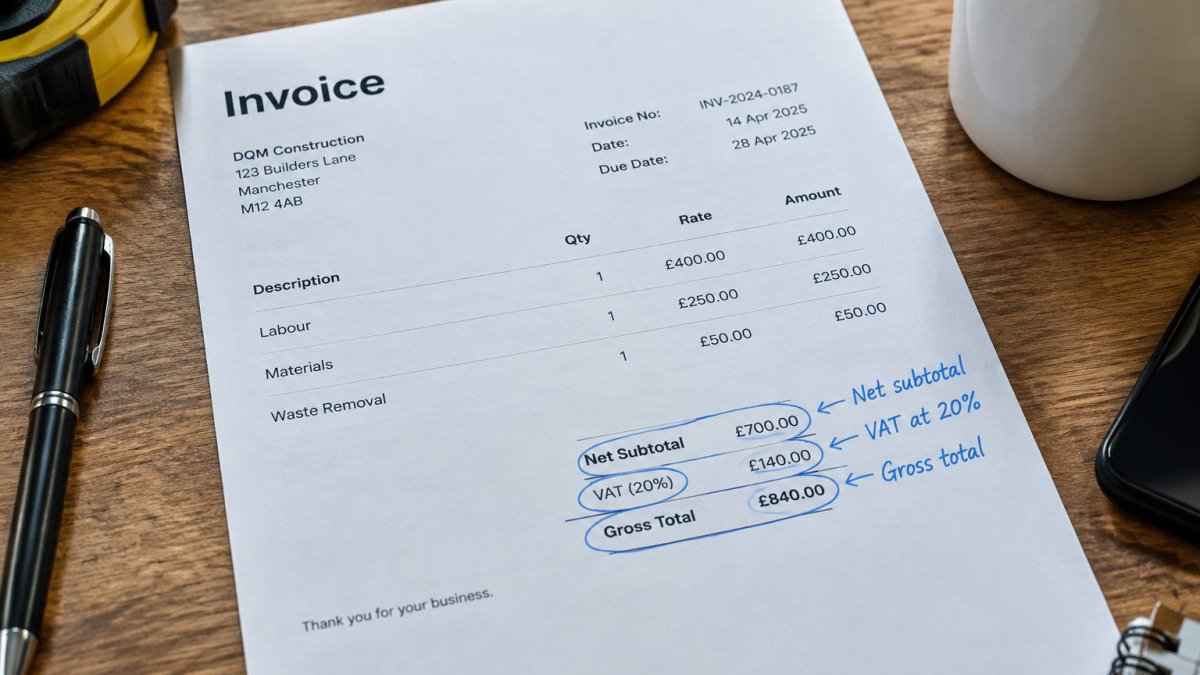
The four-step method and the worked examples below show how the figures build up, with each rate applied to its own line.
| Step | What to do | Note |
|---|---|---|
| 1. List net lines | Record each line at its VAT-exclusive price | Keep labour and materials separate if rates differ |
| 2. Net subtotal | Add the net line totals | Figure before any VAT |
| 3. Total VAT | Apply 0.20, 0.05 or 0 to each line, then add | Rate applies per line, not per invoice |
| 4. Gross total | Add total VAT to the net subtotal | Amount the customer pays |
How to Calculate VAT Included in a Price
Sometimes a supplier gives you a price that already includes VAT. To find the VAT inside it, divide the gross price by 1.20, then subtract the result from the gross price.
How to calculate VAT - Simple Method VAT Calculation
DCP Web Designers
For a £720 VAT-inclusive price: £720 ÷ 1.20 = £600 net, so VAT is £120.
Multiplying by 1.20 adds VAT to a net price. If you want to build professional trade quotes that include VAT clearly, a guide with an itemised template is available.
VAT Invoice Requirements for Sole Traders
A full VAT invoice must show your name, your VAT registration number, the invoice date, a unique number, a description of the goods or services, the net price, the VAT rate and the VAT amount, and the total due.
Many traders leave out the VAT number or rate. Missing details can make the invoice invalid for the customer's own VAT claims, so check the template before you send it.
- Your name and address
- VAT registration number
- Unique sequential invoice number
- Date of supply and invoice date
- Net, VAT and gross amounts for each rate
Mixed-Rate Invoices, Discounts, Deposits and Credit Notes
Most add-or-remove VAT guides stop at a single-rate example. Real sole trader invoices often carry more than one rate, a discount, a deposit taken weeks earlier, or a credit note issued after the fact. Each of these changes the VAT line, and getting the order of operations wrong is the most common source of small reconciliation errors.
Mixed-rate invoices
Calculate VAT per line at that line's rate, then total. Do not average the rates and do not apply the highest rate to the whole invoice.
Example: a sole trader supplies £500 of standard-rated labour (20%), £200 of reduced-rated installation (5%) and £100 of zero-rated goods (0%).
- Labour VAT: £500.00 × 0.20 = £100.00
- Installation VAT: £200.00 × 0.05 = £10.00
- Zero-rated VAT: £100.00 × 0 = £0.00
- Net subtotal: £800.00
- Total VAT: £110.00
- Gross total: £910.00
The invoice should show the VAT breakdown by rate so the customer can see how the £110.00 was built.
Discounts
Apply a discount to the net price before you calculate VAT, not to the gross total. If you discount £50 from a £500 net standard-rated job, the net becomes £450, VAT is £90.00, and the gross is £540.00.
A prompt-payment discount offered for early settlement is treated differently from a trade discount taken at the point of sale, the VAT adjustment follows the actual consideration, so if the customer pays early and takes the discount, the VAT is recalculated on the discounted amount.
Deposits
A deposit is not a separate supply; it is a payment towards the eventual supply. The VAT point depends on when the deposit is received and the tax point rules for your supply.
Example: total job £1,200 net, standard-rated. A 25% deposit is £300 net, VAT £60.00, gross £360.00. The final invoice shows £900 net, VAT £180.00, gross £1,080.00.
Credit notes
A credit note reverses part or all of a previous invoice, including the VAT.
Example: a customer is overcharged £100 net on a standard-rated invoice. The credit note shows £100.00 net, £20.00 VAT, £120.00 gross.
If the original invoice carried mixed rates, the credit note must reverse each rate proportionately, do not apply a single rate to the credit note total.
Rounding
Round the total VAT on each invoice to the nearest penny. Do not round each line and then add, because the line-level rounding can drift by a penny or two against the gross total, and the customer's bookkeeping software will flag the mismatch.
Using a VAT Calculator and Checking Your Next Invoice
Before you send an invoice, check three things: the net subtotal, the VAT at the correct rate, and the gross total. A simple calculator or spreadsheet catches most mistakes.
Talk to DQM Construction and try it free to see how it fits your workflow.
Frequently Asked Questions
Does a sole trader need to charge VAT on invoices?
Only if the sole trader is registered for VAT. Registration is compulsory once taxable turnover passes the threshold in any rolling 12-month period, currently £90,000, and it can be done voluntarily below that. An unregistered sole trader must not show VAT on an invoice or charge it to the customer. Such a trader should state clearly that no VAT is charged, and the total is simply the price agreed. Registration status should be checked with HMRC before any invoice is issued, because charging VAT without being registered creates a liability that is difficult to reverse.
How do you calculate VAT on a sole trader invoice?
For a net price, multiply the amount by 1.20 for the standard 20% rate, or multiply by 0.20 to find the VAT alone. For example, £500 net plus 20% VAT gives £100 VAT and a £600 total. List the net price, the VAT amount and the gross total as separate lines so the customer can see each figure. Apply the rate to each line item separately, then add the VAT figures together before adding them to the net subtotal. This keeps the invoice total accurate when some items carry different rates.
How do you work out the VAT included in a total?
Where a customer has been quoted a VAT-inclusive price, divide the total by 1.20 to get the net price, then subtract that from the total to find the VAT. A £720 total contains £120 of VAT, leaving a net price of £600. Use the same method for a 5% reduced rate by dividing by 1.05 instead. Doing this correctly matters because the VAT portion must be reported accurately, and a total that has been wrongly split will produce an incorrect figure on your VAT return.
What information must a VAT-registered sole trader include on an invoice?
A VAT invoice must show your name and VAT registration number, the date of supply and invoice date, a unique invoice number, the customer's name or business name, a description of the goods or services, the net amount for each rate, the VAT rate applied, the VAT amount in pounds sterling, and the total payable. Check with HMRC for the current invoice rules that apply to your business, including the requirements for simplified invoices and how long to keep records.
Talk to DQM — try it free Add dqmconstruction.co.uk as a preferred source on Google →
Frequently asked questions
- Does a sole trader need to charge VAT on invoices?
- Only if the sole trader is registered for VAT. Registration is compulsory once taxable turnover passes the threshold in any rolling 12-month period, currently £90,000, and it can be done voluntarily below that. An unregistered sole trader must not show VAT on an invoice or charge it to the customer. Such a trader should state clearly that no VAT is charged, and the total is simply the price agreed. Registration status should be checked with HMRC before any invoice is issued, because charging VAT without being registered creates a liability that is difficult to reverse.
- How do you calculate VAT on a sole trader invoice?
- For a net price, multiply the amount by 1.20 for the standard 20% rate, or multiply by 0.20 to find the VAT alone. For example, £500 net plus 20% VAT gives £100 VAT and a £600 total. List the net price, the VAT amount and the gross total as separate lines so the customer can see each figure. Apply the rate to each line item separately, then add the VAT figures together before adding them to the net subtotal. This keeps the invoice total accurate when some items carry different rates.
- How do you work out the VAT included in a total?
- Where a customer has been quoted a VAT-inclusive price, divide the total by 1.20 to get the net price, then subtract that from the total to find the VAT. A £720 total contains £120 of VAT, leaving a net price of £600. Use the same method for a 5% reduced rate by dividing by 1.05 instead. Doing this correctly matters because the VAT portion must be reported accurately, and a total that has been wrongly split will produce an incorrect figure on your VAT return.
- What information must a VAT-registered sole trader include on an invoice?
- A VAT invoice must show your name and VAT registration number, the date of supply and invoice date, a unique invoice number, the customer's name or business name, a description of the goods or services, the net amount for each rate, the VAT rate applied, the VAT amount in pounds sterling, and the total payable. Check with HMRC for the current invoice rules that apply to your business, including the requirements for simplified invoices and how long to keep records.